[To hit the mainstream] RSS has to become brain dead simple to use.
- Fred Wilson
Particls is well on the way to managing this, and this isn't something I say lightly.
The above quote was the first immediately-arresting thing I saw when I fired up the Particls web site a few weeks ago. Mind you, until recently (the 13th) it wasn't called Particls, it was called Touchstone.
"What the hell is Particls?" Good question. Particls bills itself as "personalised aggregation", or, in a sentence, automated aggregation which solicits your initial input to refine its scope, and then goes off and collates appropriate news.
Personalised aggregation IS snappier, come to think of it.
It's a desktop client, which, once installed and given a list of keywords to look for, just... Goes off... On its own... And reads the news. Sure, once it's read the news it then assesses it for relevance and then feeds back to you, humble user, providing you with relevant and (hopefully) interesting news articles from a cornucopia of feeds. Indeed, the Particls blog mentions such terms as "Personal Relevancy or Attention Management" to describe Particls (this is during a blog post discussing how Particls is not Web 3.0 which I found most amusing). The idea is that it (eventually) integrates with your calendar, email and web through a series of modular interfaces, displaying news items in popup alerts on your desktop which fade in and out. You have the option to close them sooner or sticky them with little icons in each popup.
This is what a popup looks like:

And this is how you define what you want it to keep a look out for - the Watchwords / Blacklist lists.
Watchwords

Blacklist (well, I had to put something to demonstrate, usually it's blank)

All this and more is accessible via one small tray icon - the menus are pretty well laid-out, so nipping round the options isn't much of a hassle.
You might think "pfft, this is a gimmick, unnecessary software which does little for me," but it DOES work! I just leave it going, if I'm busy and don't want to be disturbed I can set it either to a 'Low level of interruption' or define a custom level where I can choose individual thresholds for the news ticker, pebbles and popup alerts (or I can disable each one altogether, individually). That way I can avoid unnecessary procrastination when I'm trying to write my essays for Uni! The rest of the time, I just leave it on low or medium depending on how much I want to drift off whatever I'm up to at the time (because usually reading one interesting thing leads me off on a voyage of discovery around the web, usually spending 40 minutes or more reading around the subject). Particls achieves the best of both worlds: it helps me keep current with stuff I find interesting whilst not having to trawl around and manually go through RSS feeds looking for related entries to my interests.
There's a great deal of customisation available; you can define an 'interruption level' via the tray icon, and depending on the threshold, you can have a ticker along the top or bottom of your screen which shows news as it comes in, or you can just have occasional popups of relevant information.
There's also a very cool Web 2.0 interaction possibility with Particls: the Pebbles. By default, the Pebble adapter is disabled, but once enabled, it's like publishing your own "what I'm interested in" feed without having to manually update it all the time. Here's how it works:
The Particls Pebbles Adapter and Publishing Service is, by its very nature, designed to publish your Particls Item Stream to a publicly accessible hosted RSS feed. For this reason the Pebbles Adapter is turned off by default. Please note that opting into using Pebbles does make it available via the internet via an open RSS feed - we may add authentication later.
The main Particls Pebbles page has more information and suggestions on how you can use your own personalised RSS uberfeed, but this paragraph I feel highlights its usefulness in making 'your own personal Pebble':
Particls allows you to subscribe to information you care about, it learns what your interests are keeps you informed while you work. Pebbles makes Particls even more powerful by aggregating and syndicating your filtered Particls items to your very own RSS feed.
That's pretty cool by any stretch of the imagination! I do the work in the first place, the software goes off and checks out all that's available, sifts the chaff from the good stuff, and presents the end results to me for my perusal. Truly, this is RSS news how I've been wanting it to be for a long time now: just for me - all killer, no filler!
(If you got that Sum 41 reference... Well done... I think
I have 10 - yeah, ten! - invites to give away for Particls if you're interested in joining the small community of beta testers for this project. Just add your request (with an email address) to the comments page for this entry, and I'll fire you off an invite lickety split. Sharing is caring :)

So, what's this then? I found yet ANOTHER reference to a site whilst going through my site logs, this time to this IP - which also resolves as assista.com. There's no info, no pages, quite literally nothing on the web about it. What's it all about?
I'll be keeping my eyes peeled and ears pricked for news on this, it could be quite intersting. I wonder if it's anything like FreeIQ, which bills itself as 'The Marketplace For Ideas' (and which I signed up to earlier this week)? If so, that'd make it the third knowledge-based community site I've seen pop up in as many weeks!
topicblogs/0.9 (Or, TopicBlogs: vapourware or a potentially great service?)
2 comments at Saturday, April 21, 2007I just had that awful sinking feeling.
You know, the one where you think, "well, with hindsight I should have done a bit more investigating before I put my email address and name into a box and hit Submit on a webpage which has nothing more than a logo and the aforementioned form."
What the hell am I on about, you may ask? Well, a site called TopicBlogs. The site has nothing on it, and doesn't seem to have had anything on it for a while - maybe a startup which was shuffled onto the back burner, maybe something which is still in private testing stages, maybe something which is almost ready to be unleashed into the blogosphere.
I did some Googling, and found mixed information: there's a Jeff Chan listed next to topicblogs.com on a TechCrunch wiki page entry for a 2006 meetup in California - which would therefore logically imply that Jeff Chan is California-based, most likely in the Silicon Valley / Bay Area and working at a startup or incubator company. That said, maybe Mr. Chan was developing an idea on that domain, got bored and let it expire, and it was purchased to use for other more nefarious means. Maybe it's a legit site but is unfortunate to be hosted on a known-unscrupulous webhost (Layered Tech)...
...Maybe it's just a ruse to get people to put their names and email addresses into a database to get spammed, who knows (all I know is I saw a bot with that name spider my RSS feed). Whilst I write this I'm doing some parallel Googling to see if I can find anything more, and it looks like this might be a complex system devised by someone to crawl sites looking for Wordpress / TypePad sites, and then attempt to abuse the comment posting scripts to send them loads of spam. I found some fairly convincing evidence on PlanetMike's blog, and the most unfortunate thing is that that entry is only dated from the beginning of this month.
Oh well, there goes my address into the wild west of yet more spamlists (I already get a ton of spam thanks to my address being leaked onto the web via leaky mailing list archives). I also note that The Web Robot Abuse Blog notes that topicblogs is hosted on .layeredtech.com, which they already blacklist for known spam operations.
Darn it, why aren't I more careful with my email addresses sometimes? Oh well. Don't make the same mistake I did! Maybe it'll turn out alright on the night, maybe it won't. Stay tuned to see what happens.
There may be a ray of hope though (and I'm an eternal optimist); see what Nicholas Seow wrote in one of his blog entries, way back in 2005:
Apparently this crawler is linked to ping-o-matic, and is notified when you give ping-o-matic a RPC. This obviously means that topicblogs is some sort of blog-indexing service, or maybe a new social network service. It certainly gives the impression of a startup which has some sort of innovative idea they’ve yet to unveil to the world.
http://thom.org.uk/blog/Topicblogs.aspx has shown that topicblogs is somehow related to http://www.backweave.com/blog/, or Jeff Chan if the profile information is accurate. Yep, this definitely seems like a startup - a one-man mission, in fact.
Checking up on both the domains of topicblogs.com and backweave.com, we can surmise that both are owned by the same person, Tze Yi Chan, or Chan Tze Yi if we follow the Chinese naming sequence. No doubt this is the same person as Jeff Chan.
Well, I’ve been unable to find any more information, so I may just email them out of curiosity. Good luck to Jeff Chan in his endeavour, and his bot is welcome to crawl over all over the place here at propitiate.net, as long as I don’t find out anything nasty about it.
This information tallies with some of the other stuff I've already found myself, so who knows? One of life's great mysteries.
Perhaps it's just a big social experiment to see who responds to the feed scrapes and puts their address into the box... Who knows?
More references:
Thom.org.uk - topicblogs
Propitiate.net
LabNotes - Who's reading the blogosphere?
TechCrunk Wiki: techcrunh7 info (search page for Jeff Chan)
(Yeah, I know most of these articles are quite old, but that almost adds to the mystique... Such a long time without any real revelations... What could the site be? Hmmmmmmmmmm.)
Onfolio/3.0 Beta 2 ... (or, OnFolio: collaborative research and newsreading)
0 comments at Saturday, April 21, 2007I was going through the server logs on one of my (pretty much unadvertised) blogs (uniblog.co.uk) when I started noticing a LOT of hits from bots all calling themselves "Onfolio/3.0 Beta 2".
Since I'd never heard of this, I went exploring... Turns out it was a maturing web service which seems to aggregate online content and research which was recently acquired by Microsoft. From their site,
Onfolio is an add-in for the Windows Live Toolbar that helps you collect and organize online content, read RSS news feeds, and share content in emails, blogs and documents. With Onfolio, you get all of these tools built into your browser for simplicity. Whether you are planning a trip, looking for a job, investigating a major purchase, or simply looking for a better way to keep up with the news that interests you, Onfolio will help you be more efficient, thorough and organized.
From what I see, there's either existing or planned development of:
- Blogging and commenting integration
- News aggregation via XML/RSS
- Collaborative researching and sharing of information
- Creating an archive of files, research and other miscellanea for retrospective review
- Tight(er) integration into the browser to complement standard searching
... and more besides. There's loads of info on the OnFolio site.
I've had loooooooads of hits from various IPs in various subnets, but all with reverse DNSes ending in .as9105.com - one which I recognise from past experience as a Freeserve-now-Tiscali AS.
So, is it just pure coincidence that loads of (only) Tiscali users are using the OnFolio IE Search Toolbar plugin, or is there something else going on? All the IPs I checked out resolved to dynamically-assigned IPs in the ADSL ranges (194-247-239-150.dynamic.dsl.as9105.com [194.247.239.150] and 212-1-142-110.dynamic.dsl.as9105.com [212.1.142.110] are two examples) but for the life of me I can't quite work out why there's no requests from anywhere else aside from Tiscali subnets!
Anyway, this tool looks quite nifty - all the requests have been for my XML feeds, which I assume ties in with the ability of the software to aggregate news via RSS (go figure) but still, I'd not really heard about this at all and now all of a sudden looks like they're gearing up to a larger webcrawl to get their content together. And if they're spidering my little old web sites... They must be nearing out-of-beta.
So, go check out OnFolio - now owned by Microsoft (hiss) but it still looks fairly cool to use if you're into your inline toolbar widgets. There's also an OnFolio Group Blog if you're thusly-inclined, I'm pretty sure if you had any more questions about the service or where it's headed, they're all answered on there.
Indeed, it's alive. Which means, for people who were Blogger users right from the start - and were using features on their Blogger accounts which prohibited them from migrating earlier (like me!) - that Blogger has solved whatever problems were there allows me to migrate to the new Google backend, with all its extra fanciness on the Dashboard and the ability to consolidate my login to my Google account.
The update process was pretty painless to be honest; check out these screengrabs I did as each step was completed:
Step 1: my old dashboard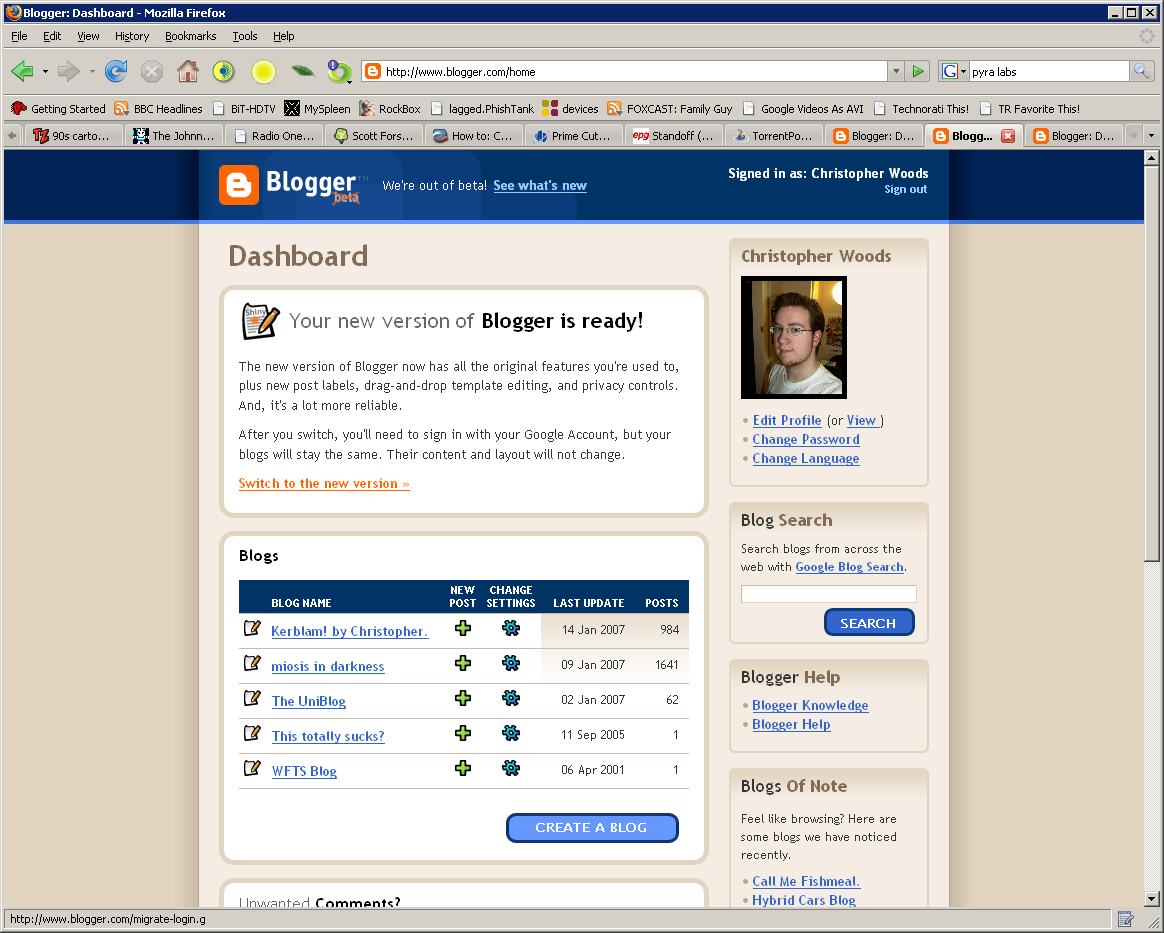
Step 2: The screen showing which blogs Blogger is going to upgrade, and which it either won't or can't for the time being
Step 3: Log in to your original Blogger account again, just to confirm the changes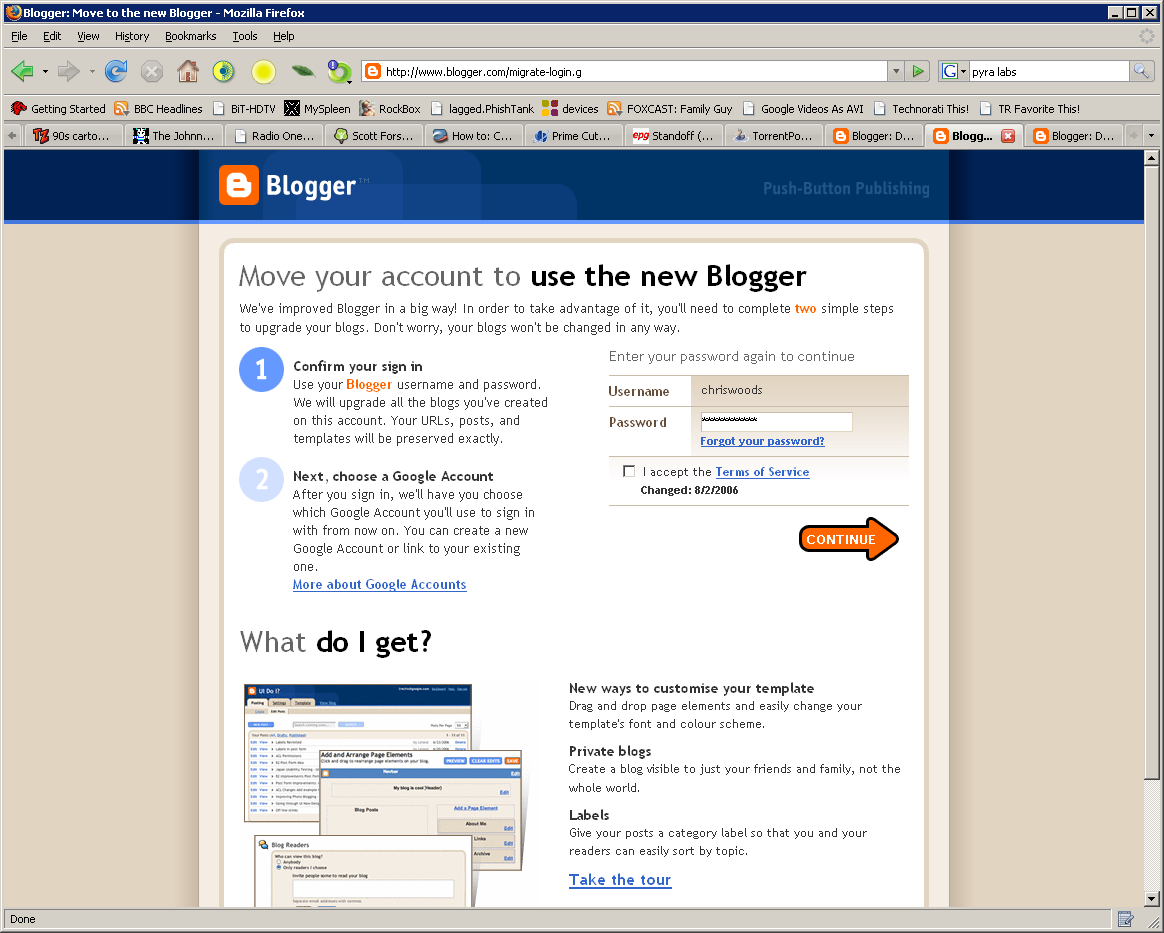
Step 4: Log in to your Google account (or create a new one, as it happens I already have two anyway)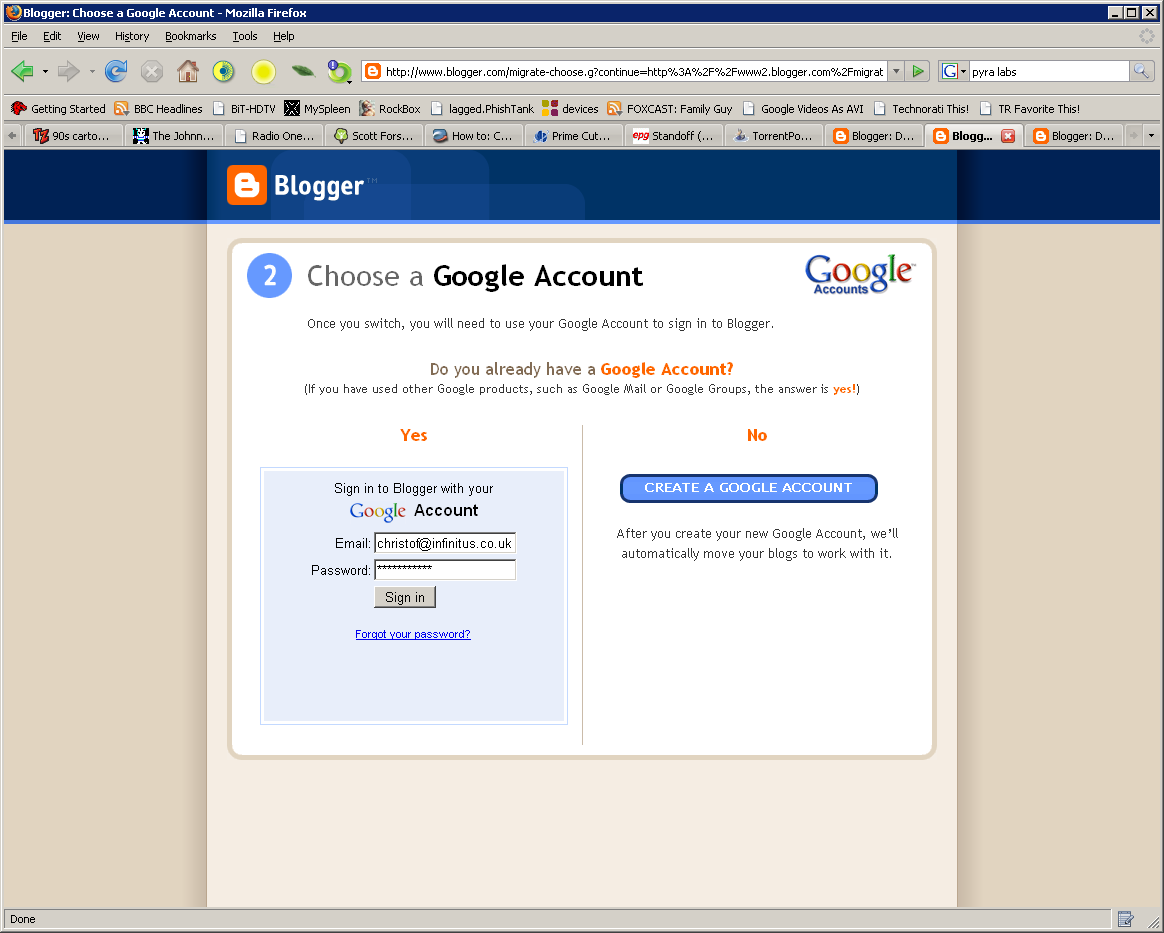
Step 5: Blogger working away in the background, switching over my accounts
Step 6: All done!
Step 7: How my new Dashboard looks :)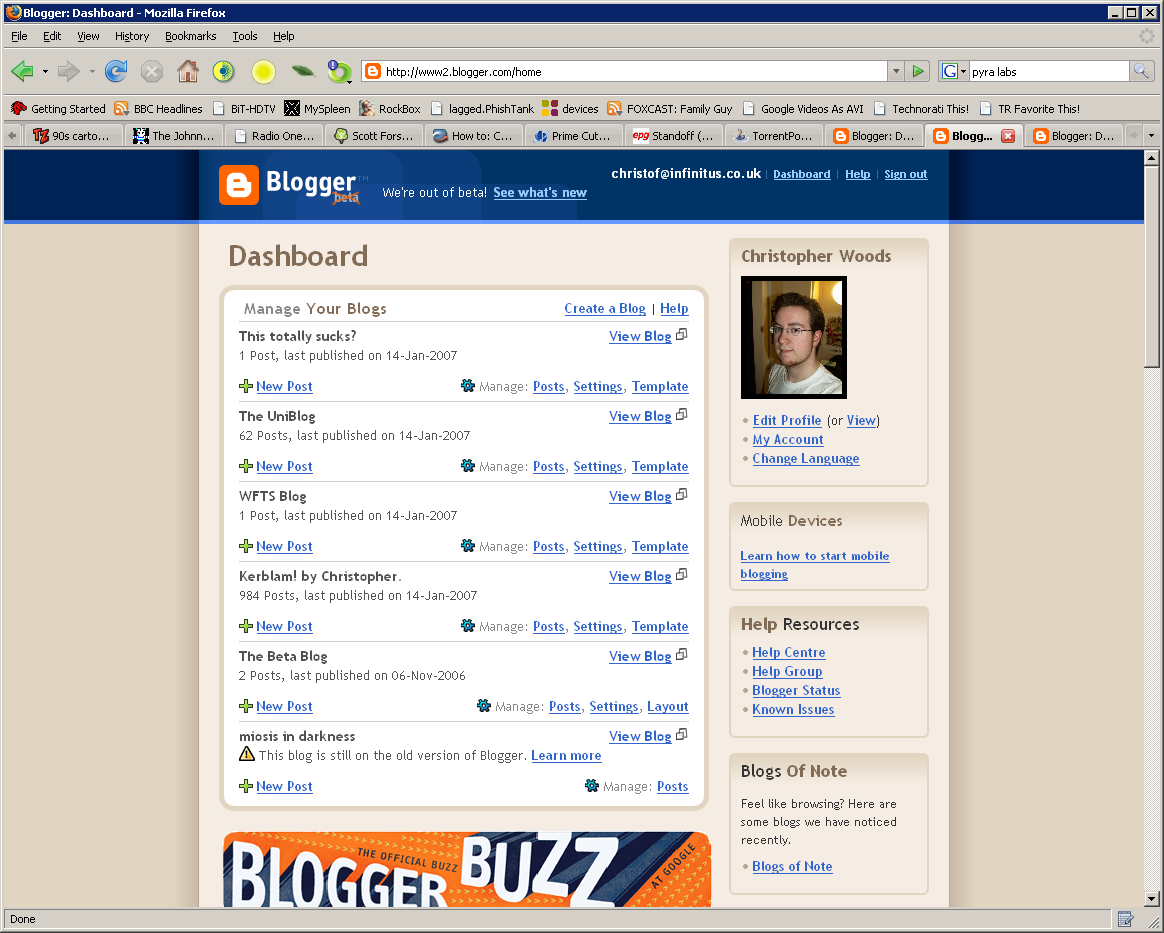
And here's my new Dashboard page, in all its glory (yes, ALL of it, it's rather long)
So there, all done! And hardly a drop of blood shed. So to anybody who's stalling or still undecided, go do it! Even better, my old blog IDs have stayed the same, so the geeky side of me can still take pride in the fact that my main blog was only the 187,628th blog EVER on the Blogger system :)
(...Man, that's SO nerdy. Woot!)
Now, this is curious.
I never do anything like this; in fact, my oldskool Blogger account is SO oldskool that my oldest blog in it has options in the Settings which aren't even available to more recent users.
That said, anything shiny and new, I have to be on the bandwagon (but of course, what's a geek to do) so here we are - Blogger Beta.
I am liking this interface, I look forward to when I can convert my old account over so as to take advantage of all these new features - I especially like the dynamic Template editor, you can pick a template from the list and then customise it with a handy drag-and-drop interface to suit your liking. That's pretty cool. In fact, all of the template screens have had a refresh, with increased in-browser flexibility for customisation without having to be well-versed in CSS/HTML (although, like in oldskool Blogger, you can enter it manually if you want).
The Create Post screen has a few small updates too, most notably an inline tags box (well, they call it 'labels' - I guess it pings Technorati and/or similar aggregators with the tags you've specified.
More coming soon, when I've had a proper chance to fully check it out - it's 4:27am now, and I have to be in Uni, in the recording studio (I'm doing BSc. Music Technology, so there's a lot of studio work) at 8am. Yay for me.
Until next time...


