If you have kids who always sit on your laptop while you're trying to work, you'll appreciate the distraction value of being able to shuffle them over to another PC and put the official CBeebies web stream on. (my old boss suffered from this 'affliction', but his daughter is quite, quite happy about the whole thing.)
However, many others bemoaned the lack of the main BBC channels, as first BBC Three, then Four, were first rolled out as a trial after BBC News' move to Flash streaming (followed by CBeebies and a couple of other channels). However, on New Years' Eve, they finally made BBC One and BBC Two's web streams public - with a bbc.co.uk front page promo for the New Year's Eve and Jools Holland's Hootenanny shows, finally available as online streams. Woohoo. The quality's not spectacular, being pipped by TVCatchup - but the fact that it's being run by the BBC means that its future is almost certainly secured, and no doubt the quality will increase, mirroring the subsequent "High Quality" stream introduction for iPlayer on-demand programming.
However, given things like the ISPs' unwillingness to have to cough up for all this sudden upsurge in Internet usage, combined with Anthony Rose's recent, somewhat misguided suggestion that ISPs should consider options such as charging an extra monthly fee for high quality stream access... Well, it doesn't exactly inspire unbridled hope, but there's still scope for change.
(A little aside by way of explanation: Mr. Rose's suggestion to ISPs was that they consider charging an extra fee, maybe upwards of £10 a month on top of the customer's existing service charge, in order to offset the cost of all the bandwidth consumed by viewing iPlayer - and other online video - content. However, vocal opponents of this idea have argued that customers are already paying for access to iPlayer, both in the form of their TV Licence and their standard monthly charge. If ISPs begin to charge extra for access to the High Quality streams, it's effectively a two-tiered Internet via the back door, and the end of net neutrality while we're at it as well. Rather grim, and I'm completely against the concept of charging extra for something we should already have full access to. Happily, I'm with Be* once again for my broadband, after moving to Virgin Media last year from Be* (due to my old house's awful phone line - the main problem for ADSL2+ customers - before VM introduced the doubled speeds, STM and P2P throttling... And unlike Virgin up-shit-creek Media, Be* aren't frustratingly backward with tiered access or restrictive bandwidth caps.
Back on point now...)
Anyway, my point of view in a nutshell: if ISPs can't afford to offer the bandwidth customers are paying for as part of their package, they should price their packages more realistically or lower the allowances. Surely they've learnt something from the mistakes the Banking sector have made over the past decade?
That aside, official online streaming of all the main channels is a welcome step in the right direction, as people like me (who've paid for a TV Licence but don't have a TV at the moment) can finally watch all the BBC channels without having to rely on grey-area platforms like the reinvented TVCatchup (which is still albeit slightly better quality, although I'm not sure how long it'll last) or Zattoo (which is so-so in terms of quality, but has some other interesting channels). The fact that it's Flash streaming means that it's not fully accessible yet across every single OS, and is not available to watch on all devices - but hopefully MP4 or H.264 streaming in a regular MKV or MP4 wrapper will be available once they sort out the rights issues (I believe they're still forced to use Flash due to DRM and geolocation restrictions). Anyway, if you want to check out the streams for yourself (UK viewers only, unfortunately), here are some links I'm sure you'll enjoy:
BBC One: http://www.bbc.co.uk/bbcone/watchlive/
BBC Two: http://www.bbc.co.uk/bbctwo/watchlive/
BBC Three: http://www.bbc.co.uk/bbcthree/livearena/ (from 7pm daily)
BBC Four: http://www.bbc.co.uk/bbcfour/watchlive/
CBBC: http://www.bbc.co.uk/cbbc/watch/cbbclive/ (7am to 7pm daily)
CBeebies: http://www.bbc.co.uk/cbeebies/watch/cbeebieslive.shtml (6am to 7pm daily)
BBC News: http://news.bbc.co.uk/1/hi/uk/7459669.stm
BBC Parliament: http://www.bbc.co.uk/iplayer/playlive/bbc_parliament/
Now, the interesting thing to note is that BBC Parliament streams from the /iplayer site. So, I decided to delve a bit - if you substitute bbc_parliament for bbc_one ... You get the BBC One stream... except those streams don't work at the moment. The same goes for "bbc_two", "bbc_three", "bbc_four", but "cbeebies" and "cbbc" do work. "bbc_news24" gives you the BBC News channel - finally, an easier to remember link than that stupidly long news.bbc.co.uk link! And, although "bbc_one" doesn't work, "bbc_one_england" does, and the same goes for "bbc_two_england". Do you smell forthcoming regional variations? All the channels' streaming pages also show the Now and Next information (and this goes for the channels' respective iPlayer live stream pages and their Watch Live pages on their respective minisites). Very handy.
Oh, and BBC Alba's also available to watch online - but as I can't understand it (it's for the Scots), I don't really care. ;)
Direct links to all of the available live streams in the /iplayer style (which I vastly prefer over the minisite-designed pages) are available via the "Watch LIVE" links at the top right of each page once you click onto the main channels. To do this, go to bbc.co.uk/iplayer and click on one of the TV channels' names in the "TV" pane - or click on TV Channels at the top of the page then click on the channel's name. Once you're there, and the channel is currently streaming, you can click the 'Watch LIVE' link. Simplicity itself (although I'd prefer a single click from the front /iplayer page to get to it, but never mind).
This is a far cry from the first public implementation of iPlayer, isn't it? Whilst not every single programme is available to view online (again, due to rights restrictions - mostly films and older programmes I would expect are not available to simulcast online, as the CBeebies "information for adults" page cryptically explains). Who would've thought that we'd still be watching Flash streams in 2009? I thought we would've been at H.264 inside an MP4 wrapper which I could stream in VLC, Media Player Classic or (shock horror) Windows Media Player, but we'll get there eventually. Hell, even a WMP stream which I could stream over my smartphone's 3G connection would be a better option, but hopefully that's in the pipeline. For the moment, Flash streams are a good warm-up for the next development :) (which hopefully should be with us soon, fingers and toes crossed on that one everybody).
Oh, and welcome to 2009 everyone! May your tech and gadget purchases be many and wonderful and without buyer's remorse.
Update, 18/05/2008: YouTube have slightly revised their interface, and are also rolling out a new player... The short instructions to see high quality videos: add &fmt=18 to the end of any YouTube URL and hit Enter to reload the video.
You'll then notice that a link should appear underneath the player saying "watch this in standard quality" - if so, you're watching the higher quality video, and clicking it will show the lower quality version you'd normally receive. You don't want to do this ;)
Going into your User Preferences (click on Account at the top of the page once you've logged in), going to the bottom of the page, clicking on Video Playback Quality and choosing the "I have a fast connection. Always play higher-quality video when it's available" option will sometimes force this option. Again, this is somewhat at YouTube's whim whether you get the high quality video or not, and I've noticed my account has been reset to the "Choose my video quality dynamically based on the current connection speed" option a couple of times now.
The longer explanation, and a commentary (with quality comparison) continues below.
I noticed the other day that YouTube's started to quietly trial higher quality video playback for an increasing amount of their video content. For me this is a long-overdue, very welcome upgrade. Low quality video and 64kbps MP3 audio are fine for the 1990s, but we're in the 21st century now thank you very much. Finally, Google gets with the plan... And here's the quick-'n-dirty hack to get higher quality playback even if YouTube doesn't want you to have it right now.
A few words before we get to the juicy bit: the experience isn't perfect yet, but this is a comparatively trial (if annoying) issue for the time being. For videos 'ingested' (i.e. uploaded by users) into the YouTube backend that were encoded as native or anamorphic widescreen (16:9, like DVDs), the higher quality videos currently play back vertically stretched to a 4:3 aspect ratio, which I've concluded is due to the player not correctly handling the higher quality widescreen content. The most likely explanation is that it either doesn't respect the 'widescreen' flag in the video (if there is one) or it can't properly display widescreen videos that haven't been encoded in a letterboxed 4:3 aspect ratio.
(Haven't a clue what I'm on about? Along with the two links in the previous paragraph, this page has quite a nice visual side-by-side comparison of what anamorphically-encoded widescreen content looks like versus regular 4:3 video.)
I'm positive that the video aspect problem is a YouTube player problem because I downloaded the the actual .flv video file with a bit of creative Wiresharking, and played it in a standalone player (I use the excellent free FLV Player from Martijn de Visser). The video displayed correctly - and it both looks and sounds fantastic.
I could actually put up with YouTube videos if they were all this quality to start with! With a decent original quality source, the quality's roughly comparable to 350Mb TV episodes (or, if you're a UK web surfer, only slightly lower quality than the BBC's iPlayer streaming videos).
I've noticed this problem with the YouTube player more than once, including on content I've encoded and uploaded to YouTube myself (and I've filed a bug report), so hopefully this will be sorted out when the higher quality video is rolled out to more of YouTube's users. They can't leave YouTube with a broken player, and I doubt they'd reencode all of the widescreen video...
Anyway, on to the most important bit! Because the "watch this video in higher quality" links aren't always visible to everybody, I thought I'd point out that there's an easy way to force the higher quality stream every time you visit a page - just append "&fmt=18" (without the inverted commas) to the URL, and hit Enter to reload the page. (Yes, I know the 'hit Enter' part shouldn't need mentioning, but there are still some people who press the Go button with their mouse, my mum amongst them!)
If you're not too familiar with URLs, it's not hard - if you're passed a YouTube URL like http://uk.youtube.com/watch?v=wwJa1fftrr0, just add &fmt=18 to the URL so it now reads as http://uk.youtube.com/watch?v=wwJa1fftrr0&fmt=18... When you load that page, it'll show the video in higher quality (and show a "Watch this video in lower quality for faster playback." link underneath the video player). If the URL looks longer or has other crap on it (like referring URL info or looks a bit like http://www.youtube.com/watch?v=bxvxSwUecWY#qIZOG5m5PCM you can either delete all the stuff after the initial video ID (the alphanumeric characters straight after "?v="), or you can add &fmt=18 to the very end of the URL.
Wired also have a few other methods you can employ to always get higher quality playback, including a couple of methods you might have overlooked.
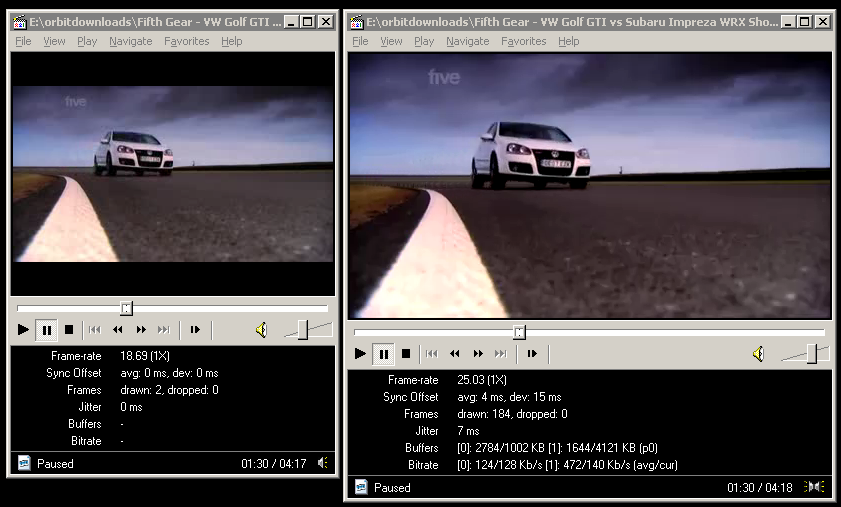
A still showing LQ vs. HQ - click for larger version
What should be immediately noticeable is the audio quality, but videos with a lot of motion will benefit too. If the video doesn't load, the higher quality video might not be encoded yet, or there might be a backend problem... All I can suggest is that you try again later, this feature isn't even being advertised yet so what do you expect? ;)
For the techies, the "watch this video in lower quality for faster playback" link both points to the URL with the &fmt=18 appended, and also toggles a JavaScript variable:onclick="changeVideoQuality(yt.VideoQualityConstants.LOW); return false;"
I've not checked, but I guess from the above that when you toggle the low quality video, the link's updated to update the value to 'VideoQualityConstants.HIGH'.
A word on bandwidth consumption... I'm not worried about Google's side of the deal, I'm sure they have ample bandwidth to cope with the higher quality - it's the end users who might get a bit of a shock when their next bill arrives from their ISP if they watch every video in high quality. As a guideline, watching high-quality videos on YouTube roughly doubles the amount of data downloaded for each video, so if you're on a limited-bandwidth broadband package (whyyyyy?!) then be mindful of the higher tariff this imposes on your limited available bandwidth. For the link I used above, a Fifth Gear clip called "VW Golf GTI vs Subaru Impreza WRX Shootout", the low quality video is 9.6Mb, and the higher quality video comes in at 19.3Mb. The video resolution is 480x264 pixels, encoded in H.264 (with an 'avc1' codec ID). The audio is AAC ('mp4a' codec ID). Here's how Media Player Classic reports it:
Audio: AAC 44100Hz stereo 125Kbps [(C) 2007 Google Inc. v06.24.2007.]
Video: MPEG4 Video (H264) 480x264 [(C) 2007 Google Inc. v06.24.2007.]
The average video bitrate clocks in at anything between 400kbps and 1mbps, and that's not including the ~128kbps for the VBR audio. Yes, I said 128kbps audio at 44.1kHz! ("CD" quality on YouTube, finally!) The peak quality of the video is 977kbps, so we're dealing with much better raw quality. The higher quality video also has a 25fps framerate, not the 10-18fps of the original quality video. $deities be praised!
For comparison, here are the statistics for the original, low quality version of the same video:
Audio: MPEG Audio Layer 3 22050Hz mono [Audio]
Video: Flash Video 1 320x240 [Video]
Unlike the high quality video (which plays back in its original 16:9 aspect ratio), the original low quality video is also encoded as letterboxed 4:3. This is a far a more inefficient use of bandwidth, and was obviously a kludgey workaround YouTube decided upon for early versions of the video player. This has had the unfortunate side effect of being incredibly annoying for people who have widescreen monitors, as you get a picture frame effect around all videos that have an original 16:9 AR. I can't wait for the day when they fix the video player and make it correctly display widescreen videos in a widescreen aspect ratio!
Finally, watching YouTube videos through your Wii is going to be a more enjoyable experience. Enjoy :)


