WordPress just announced their new video hosting service, VideoPress. (Primary URL at wordpress.tv, announcement and details currently on videopress.com). They've been working on this for a while, and initially announced this on the 11th with a post to their main blog.
'So,' you're thinking, 'WordPress are good at the text business, but what about video?' Well, if you're a content creator who has 1) more money than sense or 2) just can't be bothered to manage your own media hosting, this could be an ideal solution for you. Here's their announcement and introduction video (turn on HD in the top-right corner if you can afford the bandwidth and CPU cycles:
While it's shaping up to be really quite costly for the early adopters, they could be on to a good thing early here. How so? Well, they can leverage their existing grid computing setup to serve multimedia content and keep a tight rein on how it's delivered. Hopefully they can wrangle the carriage and peering costs down to manageable levels as the service scales. You also have the good karma that comes from having all of your multimedia hosted in the same place - so if you like easy, click-click-done solutions, it's a safe bet.
To add the VideoPress service, you just log into your WordPress.com account, go to your WP blog's dashboard, and add the service from the Upgrades category in the left-hand menu... And that's just about it.
Ok, so it's snappy to setup. What else? What about the technical features and costs? Let's dig a little deeper. While this is evidently an important first step for WP as they branch out and upgrade their service portfolio, there's room for improvement. They've developed most aspects very well, but there are a few caveats. Initial impressions are good; there's no framerate conversion of uploaded content, you can embed and enable HD playback if your content is high enough resolution - right from the embedded player - and they also support filesizes >1Gb, so yes, you can upload your 720p masterpiece if you really want to.
WP say it's quite simple to get going:
- Get a blog on WordPress.com
- Go to your upgrades page
- PayPal your way to happiness.
- Blip.tv (great quality, an intuitive interface and a personal favourite)
- Vimeo (one of the prettiest, and has a great community spirit)
- DailyMotion (just plain ubiquitous and home to metric tons of content) and
- the photographer-oriented SmugMug.

Vimeo's free service is also a great way to dip your toes in the water; you get 500Mb of storage, 1 HD video upload a week and all the other good stuff (minus HD embedding, reserved for their Plus customers), and it's a cinch to upgrade.
YouTube finally joined the 21st century late last year, with first HQ (I fondly refer to it as RQ, Regular Quality) and then proper HD - 1280x720 H.264 video making its formal debut earlier this year, after the softlaunch. (remember all that &fmt=18 nonsense?) Of course, YouTube has to be THE Number One video sharing web site, but Google is pumping money into it and still not turning a profit. Aside from the mass popularity (and huge amount of pisspoor quality content), you may decide that you'd like a little more panache, a little more style, for your multimedia content hosting.
Of course, there's nothing to stop you putting your content on every service around - and there are even some analytics companies who'll do that legwork for you, and also let you gather some useful viewer statistics for pretty good rates if you're planning on producing the next hit web video series.
Having weighed up the pros and cons of WordPress hosting, I'd say that it's a welcome progression from the WP team. They've obviously worked on this tech behind the scenes for a while, using their experience with their larger corporate clients to work the kinks out of the system before going public. However, I still personally prefer Vimeo and Blip.tv - they're better value for money and you can do just as much with them.
VideoPress has some nice automation (such as playlist generation for iTunes, Miro et al, and up to three definitions of video automatically prepared) but this is nothing standout on its own. Also, you pay a hefty premium for storage. Obviously Vimeo and the others are overselling to an extent, but given the sheer size of HD content, you'd be better off doing one of two things if you produce a lot of HD:
- Buy a Vimeo Plus account and get 5Gb a week for your uploads
- Buy your own web hosting, use one of the many free video encoder apps and stream your content with one of the several popular embedded Flash players
- ... Download the VideoPress opensource framework, install it on your own server, and use that!
Yes, you read me right - the source code for VideoPress is open-source and freely available. However, there are caveats. WP themselves make it plain that "this plugin is different from other plugins because it cannot be used 'out of the box.' It is intended for self-hosted large scale WordPress MU sites that want to develop their own customized video solutions." Aside from that, it also requires one fileserver and one dedicated video transcoder, and 'considerable amounts of PHP coding and system admin skills (skillz?) to implement and deploy.'
Well, don't let that put you off. Where there's a will there's a way, and I suspect that before long, an ad-supported service using the VP framework might just surface and offer some of the VideoPress Premium features for gratis. Who knows?
I'm not going to do a blow-by-blow comparison of all the other mentioned HD video hosting services, because people with far more time and resources have already done just that. However, VideoPress aside, they all cost nothing to try out - and I strongly suggest you try each of them to see which one fits your needs. They all have premium services, and they all have their pros and cons. But when you see such achingly gorgeous design as can be found on the Vimeo web site (even their login page is a work of art), you'd have to be made of stone to not appreciate the work which has gone into that site.
I would always suggest trying out Vimeo as one of your first candidates, and its ability to offer one HD upload a week is the ideal way for most content producers to demo the service. However, for the person who desires full and seamless integration and consolidation above all else (including value for money at the moment), VideoPress might be just what they've been waiting for.
Update, 18/05/2008: YouTube have slightly revised their interface, and are also rolling out a new player... The short instructions to see high quality videos: add &fmt=18 to the end of any YouTube URL and hit Enter to reload the video.
You'll then notice that a link should appear underneath the player saying "watch this in standard quality" - if so, you're watching the higher quality video, and clicking it will show the lower quality version you'd normally receive. You don't want to do this ;)
Going into your User Preferences (click on Account at the top of the page once you've logged in), going to the bottom of the page, clicking on Video Playback Quality and choosing the "I have a fast connection. Always play higher-quality video when it's available" option will sometimes force this option. Again, this is somewhat at YouTube's whim whether you get the high quality video or not, and I've noticed my account has been reset to the "Choose my video quality dynamically based on the current connection speed" option a couple of times now.
The longer explanation, and a commentary (with quality comparison) continues below.
I noticed the other day that YouTube's started to quietly trial higher quality video playback for an increasing amount of their video content. For me this is a long-overdue, very welcome upgrade. Low quality video and 64kbps MP3 audio are fine for the 1990s, but we're in the 21st century now thank you very much. Finally, Google gets with the plan... And here's the quick-'n-dirty hack to get higher quality playback even if YouTube doesn't want you to have it right now.
A few words before we get to the juicy bit: the experience isn't perfect yet, but this is a comparatively trial (if annoying) issue for the time being. For videos 'ingested' (i.e. uploaded by users) into the YouTube backend that were encoded as native or anamorphic widescreen (16:9, like DVDs), the higher quality videos currently play back vertically stretched to a 4:3 aspect ratio, which I've concluded is due to the player not correctly handling the higher quality widescreen content. The most likely explanation is that it either doesn't respect the 'widescreen' flag in the video (if there is one) or it can't properly display widescreen videos that haven't been encoded in a letterboxed 4:3 aspect ratio.
(Haven't a clue what I'm on about? Along with the two links in the previous paragraph, this page has quite a nice visual side-by-side comparison of what anamorphically-encoded widescreen content looks like versus regular 4:3 video.)
I'm positive that the video aspect problem is a YouTube player problem because I downloaded the the actual .flv video file with a bit of creative Wiresharking, and played it in a standalone player (I use the excellent free FLV Player from Martijn de Visser). The video displayed correctly - and it both looks and sounds fantastic.
I could actually put up with YouTube videos if they were all this quality to start with! With a decent original quality source, the quality's roughly comparable to 350Mb TV episodes (or, if you're a UK web surfer, only slightly lower quality than the BBC's iPlayer streaming videos).
I've noticed this problem with the YouTube player more than once, including on content I've encoded and uploaded to YouTube myself (and I've filed a bug report), so hopefully this will be sorted out when the higher quality video is rolled out to more of YouTube's users. They can't leave YouTube with a broken player, and I doubt they'd reencode all of the widescreen video...
Anyway, on to the most important bit! Because the "watch this video in higher quality" links aren't always visible to everybody, I thought I'd point out that there's an easy way to force the higher quality stream every time you visit a page - just append "&fmt=18" (without the inverted commas) to the URL, and hit Enter to reload the page. (Yes, I know the 'hit Enter' part shouldn't need mentioning, but there are still some people who press the Go button with their mouse, my mum amongst them!)
If you're not too familiar with URLs, it's not hard - if you're passed a YouTube URL like http://uk.youtube.com/watch?v=wwJa1fftrr0, just add &fmt=18 to the URL so it now reads as http://uk.youtube.com/watch?v=wwJa1fftrr0&fmt=18... When you load that page, it'll show the video in higher quality (and show a "Watch this video in lower quality for faster playback." link underneath the video player). If the URL looks longer or has other crap on it (like referring URL info or looks a bit like http://www.youtube.com/watch?v=bxvxSwUecWY#qIZOG5m5PCM you can either delete all the stuff after the initial video ID (the alphanumeric characters straight after "?v="), or you can add &fmt=18 to the very end of the URL.
Wired also have a few other methods you can employ to always get higher quality playback, including a couple of methods you might have overlooked.
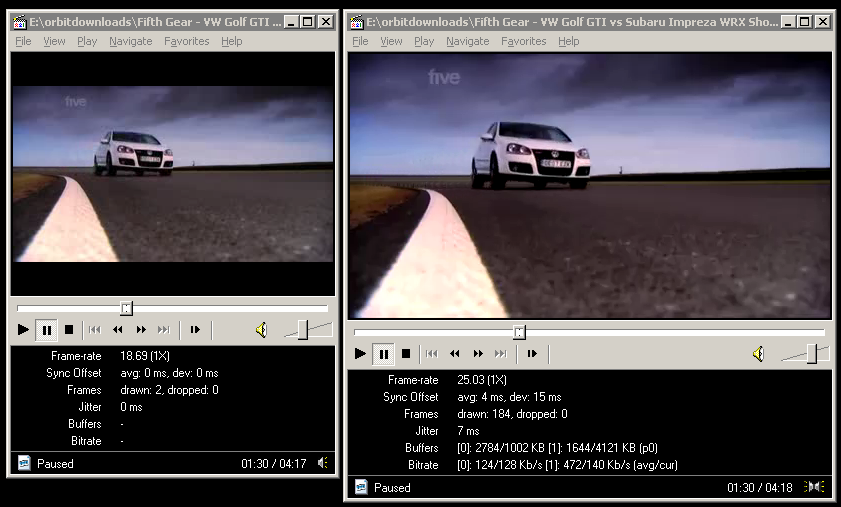
A still showing LQ vs. HQ - click for larger version
What should be immediately noticeable is the audio quality, but videos with a lot of motion will benefit too. If the video doesn't load, the higher quality video might not be encoded yet, or there might be a backend problem... All I can suggest is that you try again later, this feature isn't even being advertised yet so what do you expect? ;)
For the techies, the "watch this video in lower quality for faster playback" link both points to the URL with the &fmt=18 appended, and also toggles a JavaScript variable:onclick="changeVideoQuality(yt.VideoQualityConstants.LOW); return false;"
I've not checked, but I guess from the above that when you toggle the low quality video, the link's updated to update the value to 'VideoQualityConstants.HIGH'.
A word on bandwidth consumption... I'm not worried about Google's side of the deal, I'm sure they have ample bandwidth to cope with the higher quality - it's the end users who might get a bit of a shock when their next bill arrives from their ISP if they watch every video in high quality. As a guideline, watching high-quality videos on YouTube roughly doubles the amount of data downloaded for each video, so if you're on a limited-bandwidth broadband package (whyyyyy?!) then be mindful of the higher tariff this imposes on your limited available bandwidth. For the link I used above, a Fifth Gear clip called "VW Golf GTI vs Subaru Impreza WRX Shootout", the low quality video is 9.6Mb, and the higher quality video comes in at 19.3Mb. The video resolution is 480x264 pixels, encoded in H.264 (with an 'avc1' codec ID). The audio is AAC ('mp4a' codec ID). Here's how Media Player Classic reports it:
Audio: AAC 44100Hz stereo 125Kbps [(C) 2007 Google Inc. v06.24.2007.]
Video: MPEG4 Video (H264) 480x264 [(C) 2007 Google Inc. v06.24.2007.]
The average video bitrate clocks in at anything between 400kbps and 1mbps, and that's not including the ~128kbps for the VBR audio. Yes, I said 128kbps audio at 44.1kHz! ("CD" quality on YouTube, finally!) The peak quality of the video is 977kbps, so we're dealing with much better raw quality. The higher quality video also has a 25fps framerate, not the 10-18fps of the original quality video. $deities be praised!
For comparison, here are the statistics for the original, low quality version of the same video:
Audio: MPEG Audio Layer 3 22050Hz mono [Audio]
Video: Flash Video 1 320x240 [Video]
Unlike the high quality video (which plays back in its original 16:9 aspect ratio), the original low quality video is also encoded as letterboxed 4:3. This is a far a more inefficient use of bandwidth, and was obviously a kludgey workaround YouTube decided upon for early versions of the video player. This has had the unfortunate side effect of being incredibly annoying for people who have widescreen monitors, as you get a picture frame effect around all videos that have an original 16:9 AR. I can't wait for the day when they fix the video player and make it correctly display widescreen videos in a widescreen aspect ratio!
Finally, watching YouTube videos through your Wii is going to be a more enjoyable experience. Enjoy :)


